
Updated
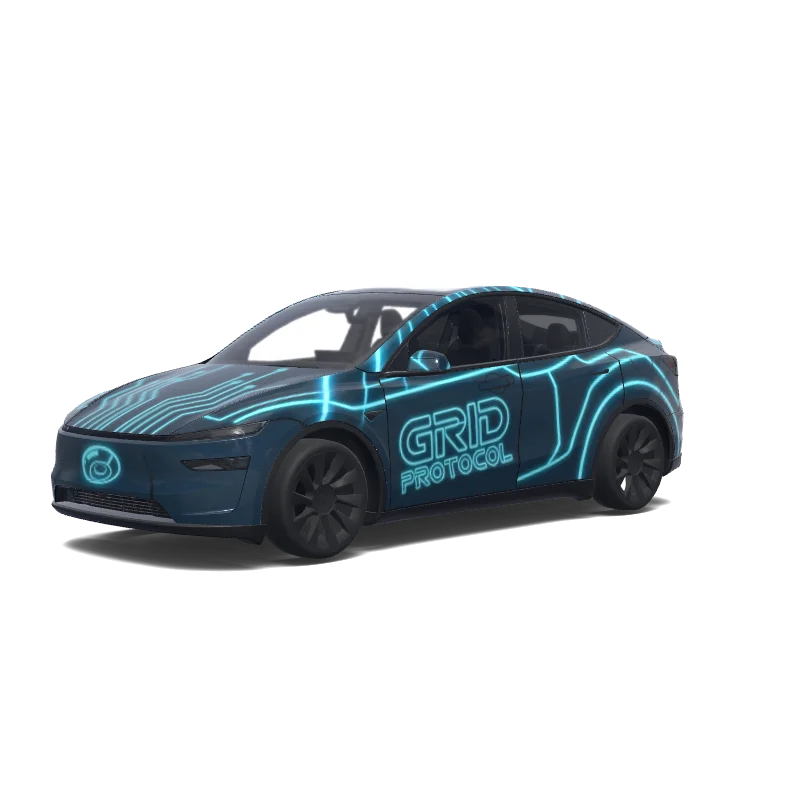
A Tron-style Tesla wrap works best as a dark base with one clear route of cyan or blue linework and, if needed, a small second accent. The community examples below show different ways to place those paths on a car. Use them to choose a composition, then rebuild or inspect it on the exact vehicle template. These are fan-made digital designs, not official Tron or Tesla artwork; the drawn glow does not add real lights, reflective vinyl or a physical wrap.
Community designs to compare
Compare these credited community vehicle previews for color and placement. Each case lists its vehicle version; preview-only concepts are labeled separately.
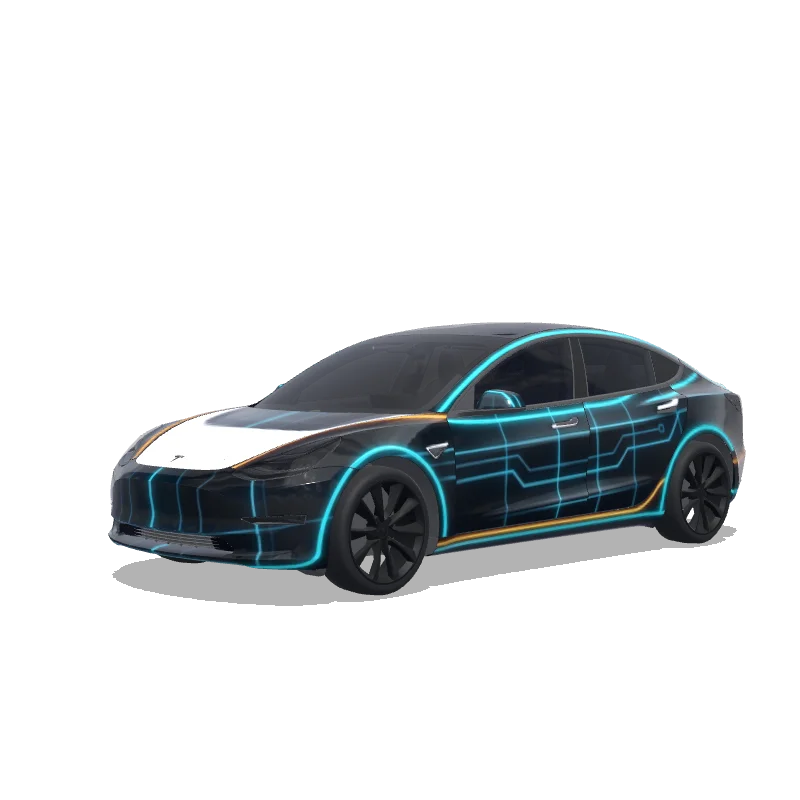
Thin blue traces and a warm orange accent take a different approach from the Model Y lettering-led case. Source PNG properties have not been checked for a direct download.
View design details →| Layout | Use it when | Check on the vehicle |
|---|---|---|
| One body outline | You want a simple, recognizable neon edge | Keep the line visible against windows, wheels and dark trim. |
| Panel-to-panel circuit paths | You want the car to feel more technical | Follow the door breaks deliberately; restart a path instead of forcing a tiny detail across a seam. |
| Bright lines plus one warm accent | You want a second point of contrast | Use the warm color in a small area so it supports, rather than competes with, the main route. |
What makes a Tron car wrap read clearly on a Tesla?
Start with contrast and direction: a dark field makes bright linework easy to notice, and one main route gives the eye somewhere to follow. The Model Y community preview below pairs cyan paths with a “GRID PROTOCOL” label; the Model 3 example uses thinner blue traces and a warm accent. Compare those choices at the size the vehicle will normally appear, then keep secondary marks quieter. In a digital PNG, the glow is drawn color and shading, not a light source.
Decide where the main path begins and ends
Sketch one route before filling the whole car: for example, let a line begin near the front corner, travel along the side, and finish before the rear wheel. Then decide whether the hood repeats that direction or stays quieter. The Model Y “GRID PROTOCOL” preview gives the side lettering a focal area while cyan paths carry the theme. Keep the front, both sides and rear related, but do not force every line to connect across every panel.
Treat each Tesla model as its own layout
The flat PNG maps onto body panels through a model-specific template. Start with the exact vehicle entry, then check the hood, doors and rear in the editor. A Model 3 line position will not automatically land in the same place on a Model Y. Tesla’s official repository lists templates by vehicle and variant; use it to confirm the canvas before you adapt a composition.
Use line weight to control clutter
If a design looks busy, remove secondary paths before shrinking every line. Keep the main route thick enough to read in a small preview and reserve thin traces for areas that stay visible. The Model 3 example’s restrained blue lines show a lighter treatment than the broader cyan paths on the Model Y. Rotate the vehicle and inspect all sides; a clean front view does not prove the doors or rear are equally legible.
Export a Paint Shop file only after checking the original
Use the correct vehicle template, export a real PNG, and check its actual dimensions and byte size before transferring it. Tesla’s published instructions specify 512 × 512 to 1024 × 1024 pixels and a maximum size of 1 MB, with the matching template size preferred. A 3D preview or a WebP cover is not the flat PNG that Paint Shop needs. Use the PNG checker and the upload guide for the file and transfer steps.
Questions before you export
Is a Tron Tesla wrap an official Tesla or Tron feature?
No. The examples are community-made digital designs. They are not official Tron or Tesla artwork, and the preview does not imply endorsement by either rights holder.
Will a cyan line in the PNG glow or animate in the car?
No. It is artwork in a static texture. The color can suggest a glow in the 3D preview, but it does not create a physical light or animated effect.
Can I use one Tron PNG on Model 3 and Model Y?
Do not assume so. Use the exact model and variant template, then inspect the artwork on that vehicle. Rebuild the layout when panel positions differ.
Does this guide cover vinyl installed on a real car?
No. It covers digital Paint Shop artwork. Physical materials and installation need their own samples and installer advice.
Continue with your wrap
Sources and compatibility
File requirements and template selections are checked against the sources below. Original palettes and layout exercises are design suggestions, not official Tesla designs or vehicle test results. Your vehicle’s features and software determine final compatibility.