
Updated
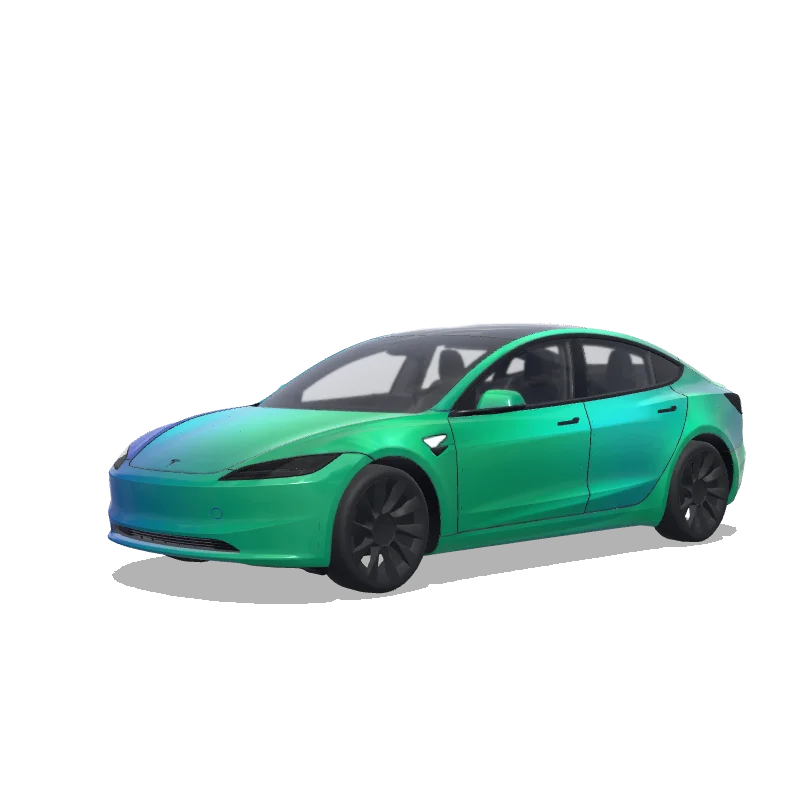
The best Tesla wrap colors for your screen are the ones that keep the design readable at the size you actually view it. Start with a dark base and one accent for a restrained look, a blue-green gradient for broad color, or purple and cyan blocks for a graphic design. The community vehicles below show these different approaches. This guide helps you choose a digital Paint Shop palette; it does not rank physical vinyl films or promise a matte, metallic or color-shifting finish.
Community designs to compare
Compare these credited community vehicle previews for color and placement. Each case lists its vehicle version; preview-only concepts are labeled separately.
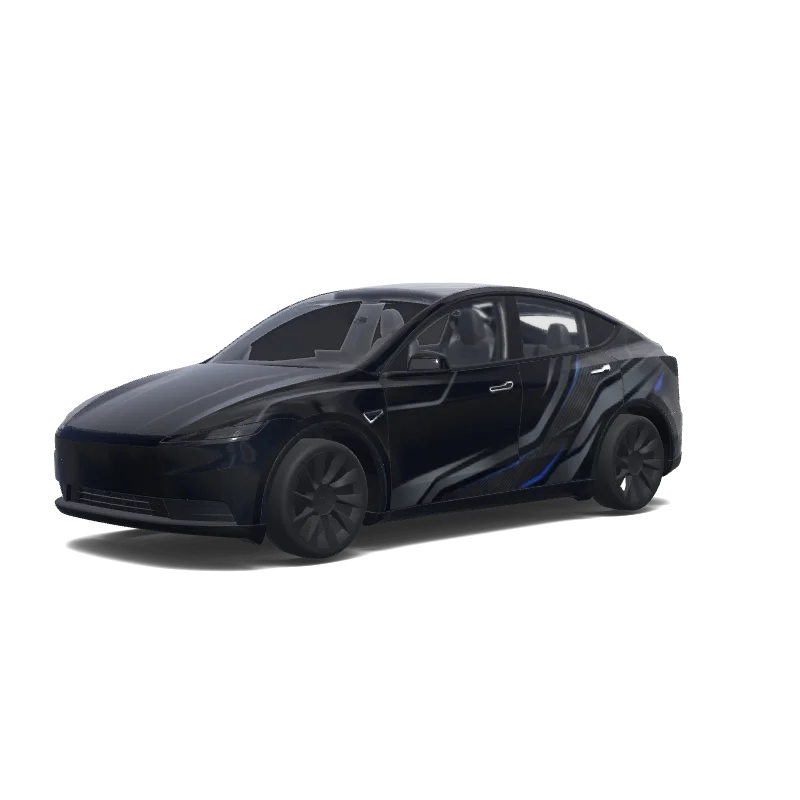
Gray side graphics and a small blue accent remain close to the dark body color. Compare the lower door detail at normal preview size; the screenshot does not establish a physical matte material.
View design details →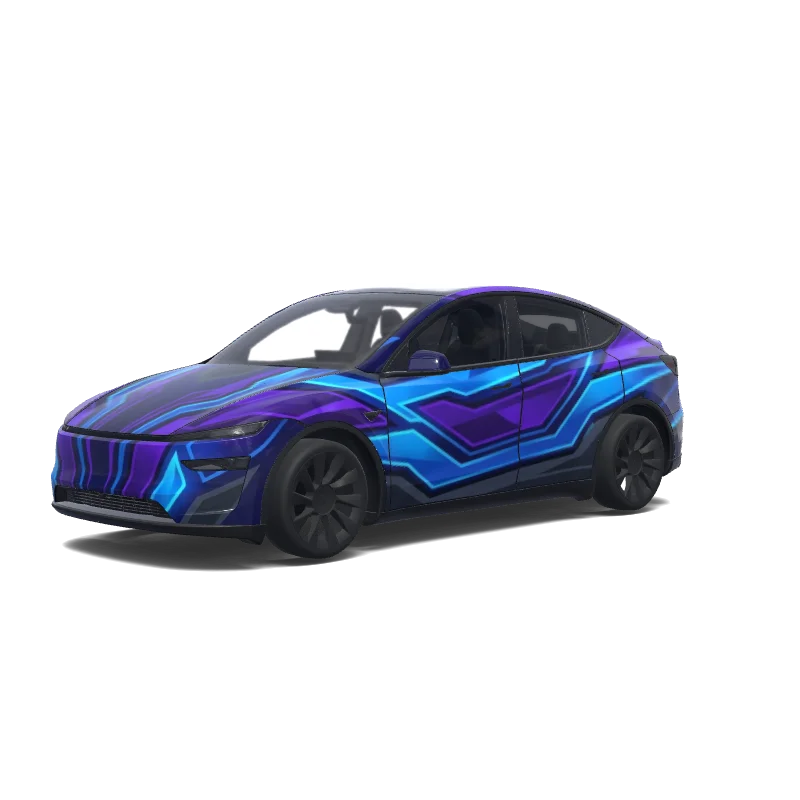
The broad blue segments give the side a clear direction while purple fills the larger fields. Study the spacing of the shapes rather than copying the entire composition.
View design details →| Direction | Useful when… | Watch for… |
|---|---|---|
| Black or charcoal + one accent | You want a quieter body with a visible side detail | Dark graphics disappearing beside dark wheels |
| Blue-green gradient | Color itself should be the main subject | A sudden color jump at the hood or rear |
| Purple + cyan | You want bold geometric artwork | Too many equally bright shapes competing |
| Cream + a dark panel | You want an illustration or number to read clearly | Pale artwork disappearing against a pale body |
| Olive + black | You want a rugged Cybertruck concept | Treating a square car PNG as a Cybertruck template |
What the three community examples show
The blue-green Model 3 makes the large body surfaces the subject instead of relying on a character or logo. The dark Model Y Standard keeps gray graphics close to the base color and uses a small blue accent along the lower side. The purple Model Y Premium takes the opposite approach: broad cyan outlines make the side graphic conspicuous. Compare the balance of light and dark rather than assuming all three files fit the same vehicle. Open the exact design to inspect its other side and rear; one cover image cannot show the whole texture.
Black and matte-black Tesla wrap ideas
For a digital black wrap, try charcoal rather than making every painted area pure black. It can leave room for a darker graphic and a small lighter accent. The dark community Model Y above is an example of this layered direction, not proof of a new material setting. A prompt containing matte black can influence the generated artwork, but the PNG does not replace the vehicle renderer’s surface material. If your search for a matte black Tesla wrap means film installed on the real body, compare physical samples with an installer; this preview is not a finish sample or a quote.
Choose Model Y wrap colors around one clear contrast
Start with one main field, one contrasting area and one small accent. For example, a cream body and navy hood create a different result from a navy body with cream door artwork even though they use the same colors. Decide which part should attract attention before placing the contrast. Our Model Y design notebook supplies four editable color plans if you want exact hex values and a build order. Those plans are exercises, separate from the downloadable community files pictured here.
For Model 3, keep the color transition deliberate
On a gradient, choose where the color starts, where it ends and whether the hood continues the side transition. A blue-green side with an unrelated bright-red hood reads differently from one continuous color family. Check the front, both sides and the rear at the normal preview size before adjusting a seam at high zoom. The original Model 3 and the refreshed Standard/Premium and Performance versions use different templates, so borrow the palette first and rebuild placement on your own version.
Cybertruck black, olive and high-contrast color plans
A black Cybertruck concept can use a charcoal upper field and a narrow pale lower graphic to make the side readable. For an olive direction, keep one large green field and use black for a smaller secondary shape rather than filling every panel with camouflage detail. These are suggested studies, not measured favorites. Cybertruck has its own rectangular layout: use the Cybertruck ideas article for actual matching community cases instead of stretching a Model Y design across the truck.
Compare color changes without rebuilding everything
Save a first draft and change only one decision: the base color, accent color or size of the contrast area. Keep the preview angle and artwork positions the same. Judge whether the main idea remains visible when the car is small on screen, then inspect the close-up. A PNG checker can confirm format and size, not whether one palette is more attractive or whether your vehicle will render the exact same shade. Keep your editable version and export the chosen model’s flat PNG when ready.
Questions before you export
What are the best Tesla wrap colors?
For a digital design, choose by contrast and the artwork you want to show: dark with a small accent, a broad gradient, or a light base around one illustration. This guide provides examples, not a popularity ranking or physical-film recommendation.
Does a matte-black PNG make the vehicle material matte?
No. It supplies color artwork. Lighting, reflections and material response come from the renderer, so a screenshot cannot certify a physical matte finish.
Can I reuse a Model Y palette on Cybertruck?
You can reuse color choices, but rebuild the artwork on the Cybertruck template. Copying or resizing a Model Y PNG does not relocate its panels.
Continue with your wrap
- Choose a community wrap to preview and download
- Build one of four Model Y color plans
- Pair Model 3 colors with a graphic layout
- Study matching Cybertruck community designs
- Digital colors versus physical vinyl finishes
- Transfer your PNG with the Tesla app or USB
- Compare plain dark, graphite and black-white looks
- Choose a pink wrap by its focal subject
Sources and compatibility
File requirements and template selections are checked against the sources below. Original palettes and layout exercises are design suggestions, not official Tesla designs or vehicle test results. Your vehicle’s features and software determine final compatibility.